
How to create a lesson in langlisto
Step by step: create a course under Materials, fill the first lesson with exercises — by hand or with AI — and reuse that material across any kind of class.
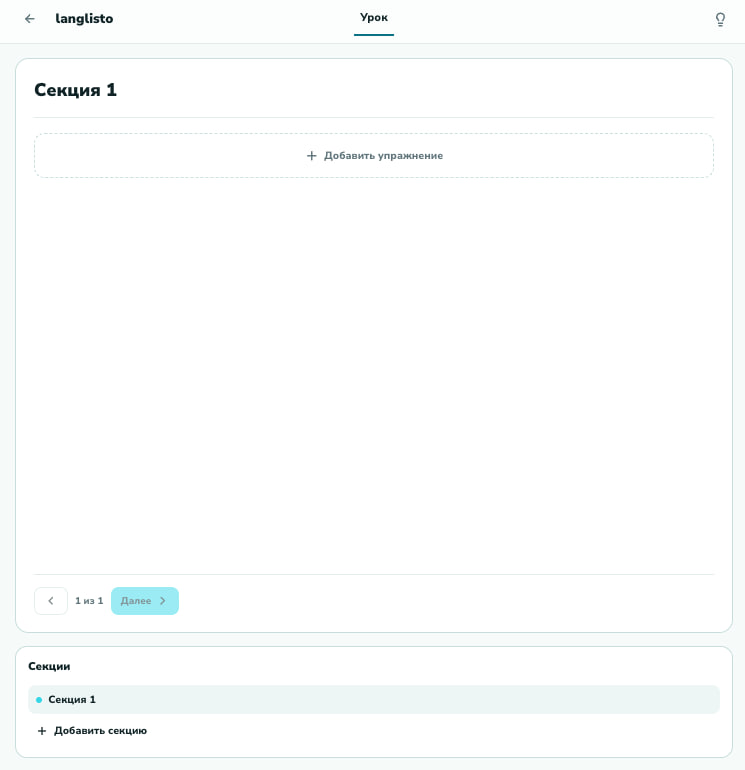
In langlisto a lesson is built from ready-made blocks, and the same material then works in one-on-one classes, in a group and in a marathon alike. Here is the whole path, step by step — from an empty course to a finished lesson.
Step 1. Create a course under Materials
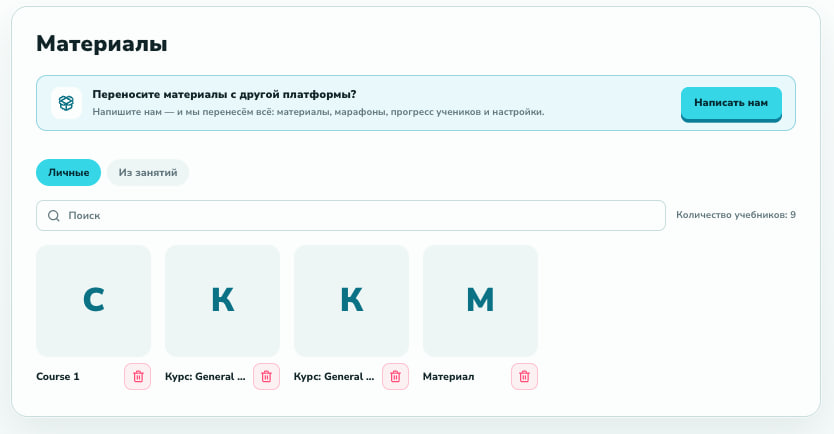
Open the Materials tab — your library of courses and textbooks. Click "Create course", give it a name, and the first lesson appears inside it right away. Materials live separately from students, so they are easy to prepare ahead of time and reuse.
Step 2. Fill the first lesson with exercises
You land straight in the editor of the first lesson. A lesson is split into sections, and sections hold exercises. Click "Add exercise" and pick the format you need: a quiz, gaps, drag-the-word, ordering, audio, video, text. Each block is a ready template — you just fill in the content.
Step 3. Build exercises — by hand or with AI
The gallery has 25+ exercise types. Pick a format, drop it into the lesson and fill in the content: all in one window, no layout work and no third-party services.
And when there is no time to build by hand — describe a topic and AI assembles a ready exercise in seconds. All that is left is to review and save.
Step 4. Reuse the material anywhere
A finished lesson is not tied to a single student. The same material can plug into one-on-one classes, into a group or into a marathon — each class keeps its own progress, while the lesson itself stays a single source. Update an exercise once and it updates everywhere it is used.
- One-on-one — the classic format
- Groups — shared material for several students at once
- Marathons — lessons unlock on schedule, work arrives with statuses
That's it. The first three months are free and card-free — enough to build a couple of courses and decide whether this is your tool.
we'll help you move your materials
